Key Takeaways
Inventory from authoritative sources (cloud asset APIs, Terraform state), not a spreadsheet someone updates twice a year.
Identity resolution across on-prem AD and cloud IAM is the actual hard part of correlation, not data volume.
Cloud connector setup is per-provider work. Budget three integration projects for three clouds, not one.
Default vendor retention (often under 90 days) rarely covers average breach dwell time (around 241 days). Check this before you sign.
Pilot for weeks, tier automation explicitly, and document the break-glass rollback before anything fires automatically in production.
Tune against MITRE ATT&CK on a quarterly cadence. Deployment doesn’t end at go-live.
Hybrid environments break in predictable ways. A domain controller that missed last quarter’s patch cycle. A cloud account three teams share without agreeing on a tagging convention. An S3 bucket that went public because someone clicked through a setup wizard too fast. XDR doesn’t fix any of that by itself. What it can do is stop those problems from hiding in separate blind spots, but only if the agent-based telemetry coming off your on-prem estate and the API-based telemetry coming out of your cloud accounts actually get sequenced and merged into one event stream, not left sitting in two consoles nobody cross-references.
What follows is a deployment runbook rather than another XDR explainer. Nine steps, roughly in the order they need to happen, and the specific points where hybrid rollouts tend to come apart.
How XDR Correlates Telemetry Across On-Prem and Cloud
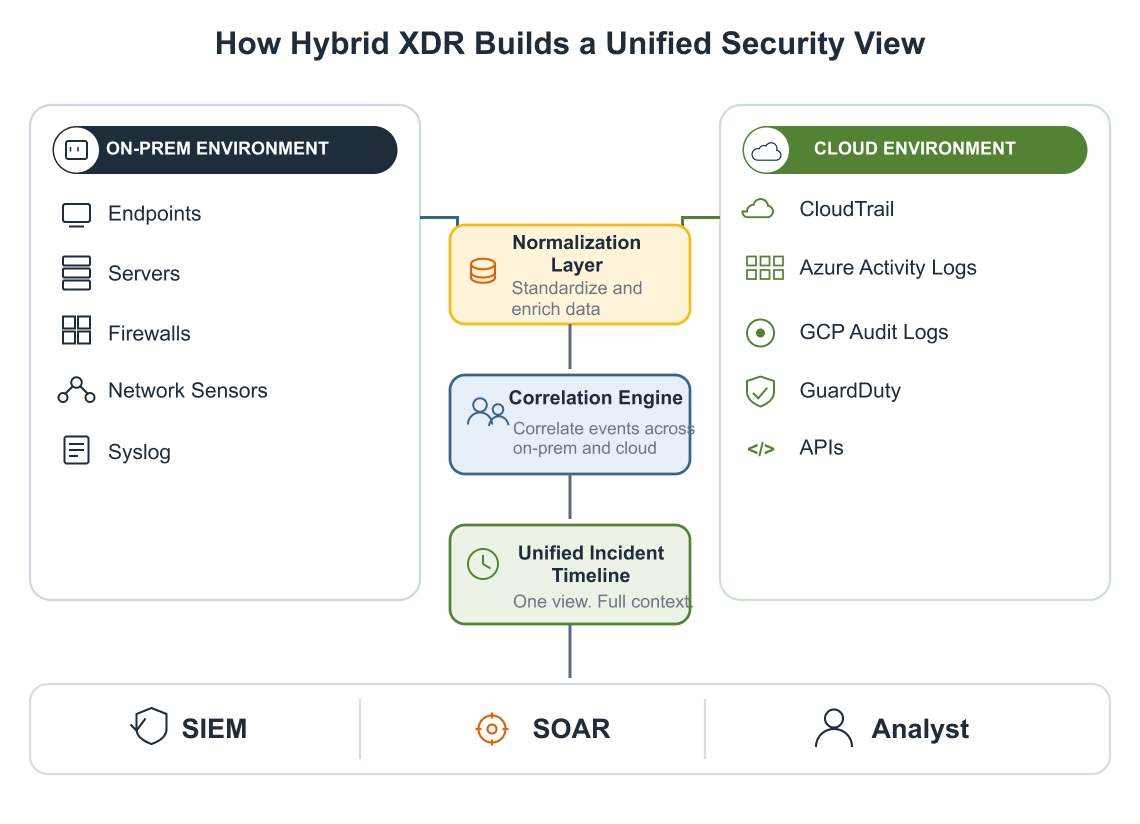
The collection model splits in two before it ever becomes one schema. On-prem, endpoint agents and network sensors do the watching, TAP or SPAN-fed, sitting inline or pulling traffic out of band. Cloud collection works almost the opposite way: instead of installing software everywhere, you’re mostly reading CloudTrail, Azure Activity Log, or Cloud Audit Logs on GCP through cross-account IAM roles or service accounts scoped to read-only. A workload agent only gets deployed when something specific calls for process-level visibility, a container handling sensitive data, a VM running a regulated workload.
Correlation lives or dies on identity resolution. A sAMAccountName pulled from an on-prem domain controller and a principal ARN from a cloud IAM role need to resolve to the same human being, otherwise, the platform has no way to connect a credential compromise on one side to lateral movement on the other. That mapping is what determines whether hybrid XDR actually functions or just ends up as two dashboards sharing a login page. How many data sources you’ve plugged in matters far less by comparison.
Monitoring Across Hybrid IT Infrastructure
Asset Awareness in Distributed Hybrid Environments
Security Controls Across Hybrid Networks & more
Why Hybrid Deployment Doesn’t Follow the Single-Environment Playbook
Legacy on-prem systems that can’t take a modern agent get covered through syslog-ng, rsyslog, or a network sensor instead, which means more upfront config than “push and forget.” Multi-cloud multiplies the integration work linearly. Each provider has its own IAM model, its own log format, its own quirks around service accounts and cross-account trust. Run three providers and you’re really running three separate connector builds. There’s no single config that covers all of them.
Identity is the part people underestimate. Federate it wrong and you get duplicate entities for the same user, which quietly breaks correlation without throwing an error anywhere. And cloud telemetry volume scales differently than on-prem. GuardDuty findings, VPC flow logs, and CloudTrail events can outpace your on-prem log volume within weeks of connecting a single production account if filtering isn’t configured at ingestion.
Step-by-Step: How to Deploy XDR Across On-Prem and Cloud Environments
1. Inventory Before You Touch a Single Agent
Pull from authoritative sources, not spreadsheets. AWS Config, Azure Resource Graph, GCP Asset Inventory, plus your Terraform state if infrastructure is managed as code. On-prem, your CMDB is only as good as its last audit, so cross-check it against actual AD computer objects and DHCP leases.
Shadow IT surfaces here. Untagged EC2 instances, a forgotten dev subscription, an S3 bucket with public read still enabled. Skip this step to move faster and you’ll spend the next six months chasing assets the platform never knew to monitor.
2. Set Deployment Requirements Against Real Metrics
Dwell time reduction, alert volume ceiling, MTTR target, pick numbers instead of adjectives. That same decision shapes the architecture question too. Do you want native XDR tied to a single vendor’s stack, or an open platform built to ingest from tools you already run?
Here’s a number that changes the retention conversation: average dwell time to identify and contain a breach still sits close to 241 days industry-wide, yet most XDR vendors default to keeping under 90 days of data. Compliance and forensics teams that need more than that should push for it in the contract, before deployment, not during an incident when someone realizes the logs they need already rolled off.
3. Roll On-Prem Agents Out in Rings
Start with ring 0, domain controllers, internet-facing systems, anything holding regulated data, before touching anything else. Push through GPO or SCCM, whichever your team already runs day to day. If Sysmon isn’t already running alongside the XDR agent on Windows endpoints, turn it on. It closes process and command-line visibility gaps that some agents leave uncovered on their own.
For gear that can’t run an agent, network sensors and syslog forwarders pick up firewalls, switches, and anything running an OS too old to support modern endpoint software.
4. Wire Up Cloud Connectors, Provider by Provider
On AWS, that’s usually a cross-account IAM role with an external ID, CloudTrail and Config findings routed through EventBridge alongside whatever GuardDuty is already catching. Azure looks nothing like that, Activity Log plus Defender for Cloud alerts pushed through an Event Hub. GCP is its own build again, Cloud Audit Logs via Pub/Sub. Treat each provider as a separate integration project with its own permission scoping. Trying to template one against the other wastes more time than it saves.
Handle identity federation in this same step. Entra ID or Okta wired into the platform lets you track a user consistently whether they’re authenticating against on-prem AD or a cloud app, and that consistency is genuinely the only way you catch someone moving between the two mid-attack.
5. Normalize to a Common Schema
OCSF, CEF, or whatever schema your platform standardizes on, map every source to it before correlation rules go live. Entity resolution matters more than how many fields you’ve mapped. A username, an IP address, a device ID, each one needs to resolve to the same object regardless of whether it came off a domain controller or out of a cloud audit log.
Build correlation logic and hunting queries as code. Version-controlled detection rules survive personnel turnover. Hand-configured consoles don’t.
6. Integrate With the Stack You Already Run
SIEM gets the enriched, correlated output for long-term retention and compliance reporting. SOAR, Cortex XSOAR, Splunk SOAR, whatever you’re on, gets the alerts that should trigger a playbook instead of sitting in a queue. Packet brokers, Gigamon or F5, aggregate SPAN and TAP feeds from high-throughput segments so east-west traffic doesn’t get dropped at the sensor.
Set these up as two-way API relationships from the start. A one-time export that nobody revisits defeats the purpose of integrating at all.
7. Give the Pilot Real Runway
One business unit, one cloud account, a bake period of two to four weeks at minimum. This is where a detection rule that fires on every backup job gets caught, or a threshold tuned for an on-prem baseline that quietly falls apart in a cloud environment with autoscaling.
Teams that rush this step tend to run it anyway, just later, after go-live, under worse conditions with real alerts flying.
8. Tier Response Automation and Write It Down
Endpoint isolation, account suspension, traffic blocks, decide per action which fire automatically and which route to an analyst first. Document a break-glass procedure for rolling back an automated action that turns out to be a false positive on a production system.
Undocumented automation is how a legitimate admin account gets locked out at 2 a.m. and nobody can explain why.
9. Put Tuning on a Fixed Cadence
Map coverage against MITRE ATT&CK on a quarterly basis and close whatever gaps turn up. Run a purple team exercise against the hybrid deployment specifically, since on-prem-only testing tells you nothing about whether your cloud detections actually fire when it counts. New cloud services get adopted faster than most detection engineering teams can track, so tuning needs a standing slot on the calendar rather than a checklist item that gets marked done after launch.
Where Hybrid XDR Deployments Actually Break
Legacy systems and multi-cloud sprawl get the most attention, but data volume is what blows budgets. Cloud telemetry unfiltered at ingestion turns into either a five-figure monthly storage bill or a SOC drowning in noise, sometimes both. Identity federation done sloppily creates duplicate entities that quietly degrade correlation accuracy for months before anyone notices the pattern. And the skills gap is real, cloud security expertise specifically is scarce, which is a staffing and training problem more than a platform problem. No feature set fixes an analyst team that’s never worked a cloud-native incident before.
How Fidelis Approaches Hybrid XDR Deployment
Fidelis rolls out in phases rather than switching everything on at once, and the sequence maps closely to the steps above. Phase one is the core platform and network visibility: standing up central management, wiring in initial data collection points, and getting baseline correlation rules working before anything else touches production. Fidelis Network’s sensors are built for exactly this stage: ultra-fast 20 GB 1U units that give high-density coverage at internet gateways and data center interconnects without needing a rack full of appliances to get real visibility.
Phase two moves to endpoints and whatever’s already running in the stack. Fidelis Endpoint® goes out the same ring-based way, non-critical systems first, expanding once behavioral analytics and automated response are actually validated against real traffic. This is also where Fidelis Deception® gets layered in, decoys and breadcrumbs seeded across network segments and Active Directory, working alongside Active Directory Intercept for identity-based detection, so lateral movement gets flagged before it reaches anything that matters. Existing SIEM, SOAR, and EDR tools get folded in during this phase too. Fidelis Elevate® is built as an open platform specifically, so this doesn’t require ripping anything out first.
Identify and neutralize threats faster
Gain full visibility across your attack surface
Automate security operations for efficiency
Cloud comes in phase three, deliberately last rather than bolted on at the start. Fidelis Halo® extends visibility to IaaS, PaaS, and SaaS workloads through cloud-native sensors and API integrations, tuned specifically for the failure modes on-prem tools don’t catch, misconfigured IAM policies enabling privilege escalation, exposed storage, and data exfiltration through cloud service APIs. Sequencing cloud last isn’t an afterthought. Cross-environment correlation, tracking a threat as it moves from on-prem infrastructure into a cloud account, only works cleanly if the identity and asset data from phases one and two are already solid by the time cloud visibility goes live.
Frequently Asked Questions
How long should a hybrid XDR pilot run before wider rollout?
Two to four weeks minimum on one business unit or cloud account, long enough to catch a detection rule tuned for on-prem baselines that misfires against cloud autoscaling behavior.
Does cloud XDR deployment require agents on every workload?
No. Most cloud telemetry comes through API connectors reading provider logs directly, CloudTrail, Activity Log, Cloud Audit Logs. Agents get reserved for workloads where you need process-level visibility beyond what the control plane exposes.
What’s the biggest identity pitfall in hybrid XDR?
Federating on-prem AD and cloud IAM sloppily creates duplicate entities for the same user. Correlation degrades quietly, no error thrown, and it’s usually caught months later during an incident review.
Should retention policy differ between on-prem and cloud data?
It often needs to be longer than vendor defaults either way. Average dwell time to identify and contain a breach runs close to 241 days; many platforms retain under 90 by default. Negotiate this at contract time.
Can XDR cover legacy on-prem systems that don’t support agents?
Yes, through syslog forwarding, network sensors, or event forwarders positioned to catch traffic from switches, firewalls, and unsupported operating systems that can’t run modern agent software.
Key technical terms mentioned in this article are linked below for further exploration:
The post How to Deploy XDR Across On-Prem and Cloud Environments: A Step-by-Step Strategy appeared first on Fidelis Security.
No Responses