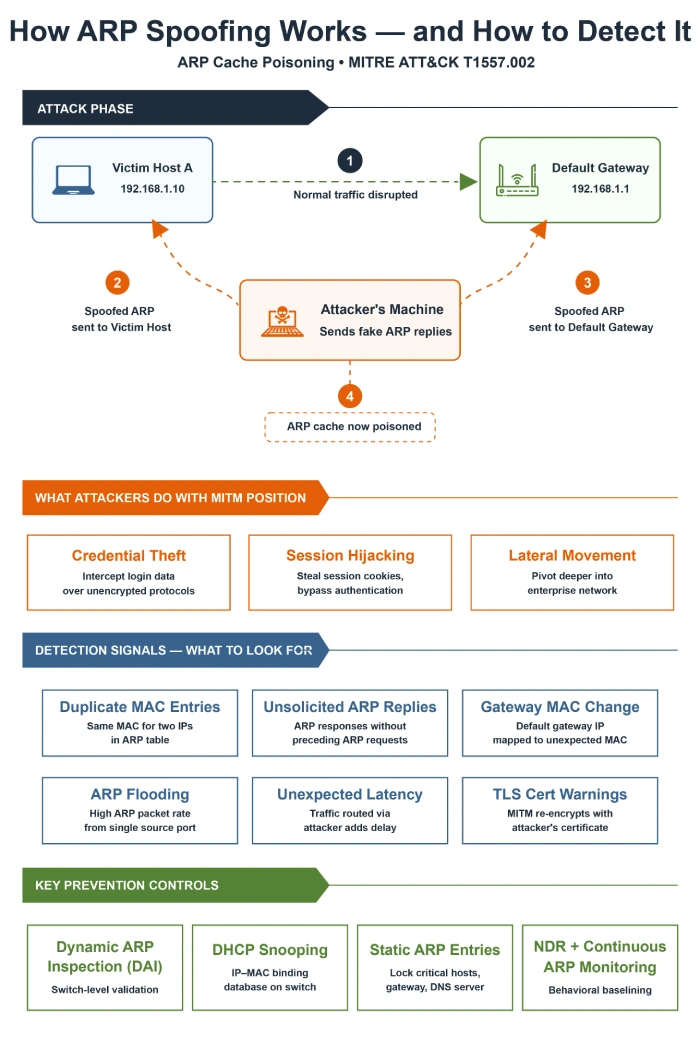
Key Takeaways
ARP spoofing succeeds because ARP lacks authentication, making trust easy to exploit within local networks.
Detection depends on identifying anomalies like MAC inconsistencies, unsolicited ARP replies, and unusual traffic behavior.
Switch-level controls such as Dynamic ARP Inspection and DHCP snooping provide strong first-line defense.
Continuous monitoring using NDR helps detect subtle man-in-the-middle activity that static controls may miss.
Fast detection is critical, as attackers use ARP spoofing to enable credential theft and lateral movement.
Every device on your network makes a quiet assumption. When a host wants to talk to another device on the same local area network, it sends out an ARP request asking which MAC address belongs to a given IP address. The device that responds gets trusted. No authentication exists. No verification occurs. Just a reply.
That blind trust becomes the entire premise of ARP spoofing. An attacker inside your network replies first with fake ARP messages. They associate their own MAC address with someone else’s IP. Victim devices update their ARP cache. All traffic meant for that IP flows straight through the attacker’s machine.
In 2026, ARP cache poisoning remains one of the most widely used techniques for positioning inside enterprise networks. MITRE ATT&CK catalogs it as sub-technique T1557.002 under Adversary-in-the-Middle. Active threat groups including Cleaver and LuminousMoth use it.
This article breaks down exactly how the attack works. It shows what detection looks like at different network layers. It explains how to build a practical ARP monitoring and prevention stack that holds up in real enterprise environments.
What Is ARP and Why Is It Easy to Exploit?
The Address Resolution Protocol (ARP) was designed for local area networks where devices need to find each other by hardware address. When a host does not know the MAC address for a target IP, it broadcasts an ARP request across the segment. The right device answers with its MAC address. The process stays simple. It runs fast. ARP remains stateless.
That statelessness creates the problem. The ARP protocol has no mechanism to verify whether a response proves legitimate. Any device on the local network can send an ARP reply. The receiving host updates its ARP cache accordingly. Designers intended this behavior. It made sense for trusted internal networks in the 1980s. Modern attackers who gain minimal network access break that assumption.
An attacker running ARP spoofing broadcasts gratuitous ARP messages. These unsolicited ARP replies announce a particular IP-to-MAC mapping to every device on the segment. The attacker claims the default gateway IP belongs to their MAC address before the real gateway responds. Every host on that segment sends all outbound traffic to the attacker.
ARP operates at the data link layer (OSI Layer 2). It resolves IPv4 addresses to MAC addresses within a single local network segment. ARP packets never cross routers. ARP spoofing stays a local network attack. It does not work across routed boundaries unless the attacker already has Layer 2 access to the target segment.
How an ARP Spoofing Attack Unfolds Step by Step
Understanding the attack lifecycle makes detection practical. Here is how a typical ARP poisoning attack plays out inside an enterprise network after an attacker establishes initial access.
Step 1: Reconnaissance:
The attacker passively monitors ARP traffic on the segment to map which IP addresses stay active. They identify the default gateway. They locate high-value hosts such as domain controllers and DNS servers.
Step 2: Cache poisoning:
The attacker sends gratuitous ARP replies claiming the gateway’s IP address associates with the attacker’s MAC address. They simultaneously send a second stream of spoofed ARP messages telling the gateway that the victim host’s IP maps to their MAC.
Step 3: Traffic interception:
Both victim and gateway route their traffic through the attacker’s machine. The attacker relays packets transparently. Neither side notices disruption. The attacker captures everything in between.
Step 4: Credential and session theft:
The man-in-the-middle position lets the attacker harvest credentials sent over unencrypted protocols. They strip TLS from HTTPS sessions through SSL stripping. They capture session cookies for session hijacking.
Step 5: Lateral movement:
Stolen credentials and session tokens become the key to moving deeper into the network. The attacker accesses additional systems. They establish persistence.
Why This Still Matters in 2026: The Cost of Network Attacks
Financial consequences of network-level intrusions reach new highs. The IBM Cost of a Data Breach Report 2024[1] states the global average cost of a data breach reached $4.88 million. That figure marks a 10% increase from 2023. It represents the largest single-year jump since the pandemic. For US organizations specifically, the average climbed to $9.36 million per breach.
The same report found 40% of breaches involved data spread across multiple environments. Those multi-environment breaches took an average of 283 days to identify and contain. Attackers maintaining persistent ARP-based MITM positions exploit that long window.
The Verizon 2024 Data Breach Investigations Report[2] analyzed more than 30,000 security incidents and over 10,000 confirmed breaches across 94 countries. Exploitation of vulnerabilities as an initial access step nearly tripled year-over-year. That growth reached roughly 180%. Internal network exploitation gives attackers position for sustained, low-visibility campaigns.
MITRE ATT&CK updated detection guidance for ARP cache poisoning (DET0387) in October 2025. It specifically flags behavioral indicators. Multiple IP addresses resolve to a single MAC address. Unsolicited ARP replies come from unauthorized devices. Enterprise networks observe both with proper monitoring.
Maturing Advanced Threat Defense
4 Must-Do’s for Advanced Threat Defense
Automating Detection and Response
What Does ARP Spoofing Look Like? Key Detection Signals
ARP spoofing attacks leave distinct traces at multiple layers. Most organizations fail to actively look for them. Here are the six signals that matter most.
1. A Single MAC Address Mapped to Multiple IPs
The most reliable indicator of active ARP poisoning shows a single MAC address in ARP table entries alongside multiple different IP addresses. Run arp -a on Windows endpoints or arp -n on Linux. The attacker’s MAC appears next to both endpoint IP and default gateway IP. The ARP cache shows poisoning.
2. The Default Gateway MAC Changes Unexpectedly
Stable enterprise environments keep the MAC address associated with the default gateway nearly constant. A sudden, unplanned change to the gateway’s ARP entry serves as a high-confidence attack indicator. Monitor this signal continuously.
3. Unsolicited ARP Replies Spiking on a Segment
Normal ARP traffic involves replies corresponding to prior requests. ARP flooding attacks or sustained poisoning campaigns send constant gratuitous ARP messages. These prevent legitimate cache entries from restoration. A sudden spike in unsolicited ARP replies from a single source creates a clear behavioral anomaly.
4. ARP Replies With Mismatched Source Addresses
Forged ARP replies show sender MAC address in the ARP payload that does not match the source MAC address in the Ethernet frame header. Packet-level ARP monitoring checking this discrepancy catches many spoofing tools automatically.
5. Unexplained Network Latency on Specific Segments
Traffic routed through an attacker’s machine takes longer paths. Unexplained latency spikes affect specific network segments or hosts. These spikes occurring alongside ARP table changes warrant investigation as potential MITM conditions.
6. Unexpected TLS Certificate Warnings
Attackers terminating HTTPS sessions re-encrypt traffic with their own certificate. Users encounter certificate errors. This signal stays ARP nonspecific. It frequently becomes the first visible symptom of active ARP-based MITM. Tracking certificate warning events alongside network anomalies adds context.
ARP Spoofing Detection Methods Compared
No single technique catches every variant. This table compares main detection approaches by mechanism and deployment context.
Detection MethodHow It WorksBest Suited For
ARP table monitoringCompares live ARP entries against known-good baseline. Flags duplicate MAC-to-IP mappings or unexpected changes to critical hosts (default gateway, DNS server).All environments. Low-cost starting point.Dynamic ARP Inspection (DAI)Switch-level validation of all incoming ARP packets against DHCP snooping binding database. Drops forged ARP replies before reaching hosts.Managed enterprise LAN with 802.1Q VLANsDHCP snoopingBuilds authoritative IP-to-MAC binding table that DAI and IP Source Guard rely on. Enable per-VLAN before DAI functions.Required prerequisite for DAIPacket capture & analysisFull ARP traffic inspection via Wireshark or NetFlow. Detects rate spikes, gratuitous ARP floods, replies without matching requests.SOC-supported environments with SPAN/TAPStatic ARP entriesManually pins IP-to-MAC bindings for high-value infrastructure. OS will not overwrite static entries with incoming ARP replies.Small, stable segments. Critical servers.NDR / XDR platformsBehavioral baselines across full network. Correlates ARP anomalies with session data, DNS, authentication events for high-fidelity alerting.Modern enterprise SOC with 24/7 monitoring
How to Configure Dynamic ARP Inspection (DAI) in Enterprise Networks
Dynamic ARP Inspection provides the most widely deployed hardware-level control against ARP spoofing in enterprise local area networks. It works at network switch level. Cisco Catalyst[4] supports it natively along with most modern managed switch platforms.
DAI intercepts all incoming ARP packets on ports designated as untrusted. Every port connected to end-user device or workstation qualifies as untrusted. For each ARP packet, DAI cross-references claimed IP-to-MAC binding against DHCP snooping binding database. Invalid binding results in packet drop and violation log.
How DHCP snooping and DAI work together:
DHCP snooping passively monitors DHCP handshakes on switch. It builds table of trusted IP-to-MAC bindings. DAI uses that table as reference truth. DHCP snooping must enable per-VLAN before DAI functions correctly.
Key configuration points for enterprise DAI deployments:
Enable DHCP snooping per-VLAN on all access-layer switches before enabling DAI.
Mark switch uplinks (trunk ports connecting to other switches or routers) as DAI trusted. All host-facing ports remain untrusted, the default setting.
Devices with static IP addresses (servers, firewalls, printers) evade DHCP snooping capture. Configure ARP ACLs to define static IP-to-MAC mappings explicitly.
DAI processing runs in switch CPU, not ASIC. Configure per-port ARP rate limits to prevent attacker ARP flooding from overwhelming switch. Cisco recommends default of 15 ARP packets per second on untrusted ports.
DAI must enable on every access-layer switch on path. Single unconfigured switch creates gap letting spoofed ARP packets propagate to trusted segments.
When to Use Static ARP Entries
Static ARP entries pin specific IP addresses to specific MAC addresses at operating system level. Once configured, OS will not overwrite static entry when receiving ARP replies, regardless of claims.
This approach works well protecting critical infrastructure. Target default gateway, DNS servers, domain controllers, authentication servers. These devices rarely change MAC addresses. ARP entry poisoning carries severe consequences.
Scale presents limitation. Maintaining static ARP entries across every device in large enterprise environment proves operationally impractical. Static entries best reserve for highest-value, lowest-change assets. DAI and DHCP snooping handle dynamic host population.
Why Network Traffic Analysis Catches What Switches Miss
DAI and static ARP entries provide strong Layer 2 controls. They cannot detect attacks originating from compromised internal host already holding valid DHCP lease. That host appears trusted by DHCP snooping. They also cannot correlate ARP anomalies with broader attacker behavior patterns across network.
Network traffic analysis and Network Detection and Response (NDR) platforms address gaps. Effective ARP monitoring at traffic level involves these steps:
Capture ARP packets across all monitored segments. Verify replies correspond to prior requests.
Build behavioral baselines for normal ARP traffic volume per segment. Alert on sustained deviations.
Flag ARP entries for critical hosts (gateway, DNS, authentication servers) when changing outside planned maintenance window.
Correlate ARP anomalies with lateral movement indicators. Examples include unexpected authentication attempts, new connections to privileged systems, unusual DNS patterns.
Check ARP replies where sender MAC in ARP payload differs from source MAC in Ethernet header. Spoofing tools commonly produce this artifact.
Modern XDR platforms map detected ARP anomalies to MITRE ATT&CK technique T1557.002. Security operations teams receive actionable threat intelligence context rather than raw network alerts.
ARP Spoofing Prevention: Full Control Checklist
Layered approach covers single control gaps. Table organizes full prevention stack with configuration guidance.
ControlConfiguration NoteWhy It Matters
Enable DHCP snoopingPer-VLAN on all access switchesRequired foundation for DAIEnable Dynamic ARP Inspection (DAI)Untrusted on host ports. Trusted on uplinks only.Blocks forged ARP replies at switchConfigure port securityLimit MAC addresses per switchportReduces attacker impact radiusSet static ARP entriesFor gateway, DNS, domain controllersPrevents poisoning of critical hostsDeploy 802.1X network access controlAuthenticate devices before LAN accessStops unauthorized devices joiningEnable ARP monitoring in NDR/XDRContinuous behavioral baseliningDetects attacks DAI cannot seeEnforce TLS + HSTS everywherePrevent SSL stripping post-MITMLimits credential exposureIntegrate with SIEMCorrelate ARP alerts with auth and flow dataReduces mean time to detect (MTTD)
Do Encrypted Tunnels Stop ARP Spoofing?
Encrypted tunnels do not stop attack itself. They limit attacker success with MITM position. Sensitive communications between clients and servers through encrypted tunnel deliver ciphertext to attacker rather than plaintext credentials. TLS, IPsec, and VPN all qualify.
This defense-in-depth proves meaningful. Attacker successfully poisoning ARP cache but unable to read captured traffic gains limited value from position. Encryption fails to prevent SSL stripping without proper HSTS enforcement. ARP flooding still disrupts network services.
Enforce TLS for all sensitive internal communications. Implement HSTS with long max-age directives. Use IPsec or VPN tunnels for inter-segment traffic carrying privileged data. These controls reduce impact of successful ARP spoofing attack even when detection fails.
How Fidelis Network® Detects ARP Spoofing and Its Follow-On Activity
Dynamic ARP Inspection blocks forged ARP replies at the switch. It cannot connect those detections to subsequent attacker activity across network segments.
Fidelis Network® monitors east-west traffic where ARP-based MITM attacks occur. The platform analyzes full communication sessions rather than individual packets through Deep Session Inspection® (DSI).
DSI reconstructs sessions and extracts metadata from protocols and files. This session context reveals ARP anomalies that appear as normal traffic to packet-based tools.
The platform correlates ARP events with network flows, endpoint data, and authentication activity. Machine learning and MITRE ATT&CK mappings tie unexpected MAC bindings to technique T1557.002.
Fidelis Deception® uses decoys across network segments to detect post-poisoning reconnaissance. Attackers interact with decoys during lateral movement after successful cache poisoning.
For VLAN topologies and static IP segments beyond DAI reach, Fidelis Network® provides visibility into ARP activity without switch configuration changes.
Our customers detect post-breach attacks over 9x Faster
Detect Advanced Threats Before Damage Escalates TrustedCybersecurity Leader for 20+ YearsSee why security teams choose us over other solutionsSee Fidelis in ActionRequest a Demo
Article Summary: Detecting ARP Spoofing in Enterprise Networks
AreaWhat to Look ForHow to DetectTools or MethodsWhy It Matters
ARP behaviorOne MAC mapped to multiple IPsCheck ARP tables on endpoints and serversarp -a, arp -n, network scansClear sign of ARP cache poisoningGateway integrityUnexpected change in gateway MAC addressContinuously monitor ARP entries for gatewayARP monitoring tools, scriptsHigh-confidence indicator of MITM attackARP traffic patternsHigh volume of unsolicited ARP repliesAnalyze ARP traffic for reply spikes without requestsPacket capture, NDR platformsIndicates active poisoning or ARP floodingPacket consistencyMismatch between ARP payload MAC and Ethernet header MACInspect packet-level ARP detailsWireshark, deep packet inspection toolsDetects forged ARP responsesNetwork behaviorSudden latency or unusual routing patternsCorrelate performance issues with ARP changesNetwork monitoring tools, NDRTraffic is being intercepted or redirectedUser-facing signalsTLS certificate warnings or HTTPS errorsMonitor endpoint alerts and browser warningsEndpoint monitoring, SIEMEarly sign of active MITM interceptionSwitch-level validationInvalid ARP packets on untrusted portsEnable ARP validation at switch levelDynamic ARP Inspection with DHCP snoopingBlocks spoofed ARP before reaching hostsCritical asset protectionUnauthorized ARP changes for key systemsLock IP to MAC mappingsStatic ARP entriesPrevents poisoning of high-value targetsNetwork-wide visibilityARP anomalies linked with suspicious activityCorrelate ARP events with authentication and traffic dataNDR or XDR platformsDetects attacks that bypass switch controlsDefense in depthEncrypted traffic still being interceptedValidate encryption and monitor anomaliesTLS, HSTS, VPN, traffic analysisLimits impact even if spoofing succeeds
Citations:
Key technical terms mentioned in this article are linked below for further exploration:
The post How to Detect ARP Spoofing in Enterprise Networks appeared first on Fidelis Security.
No Responses