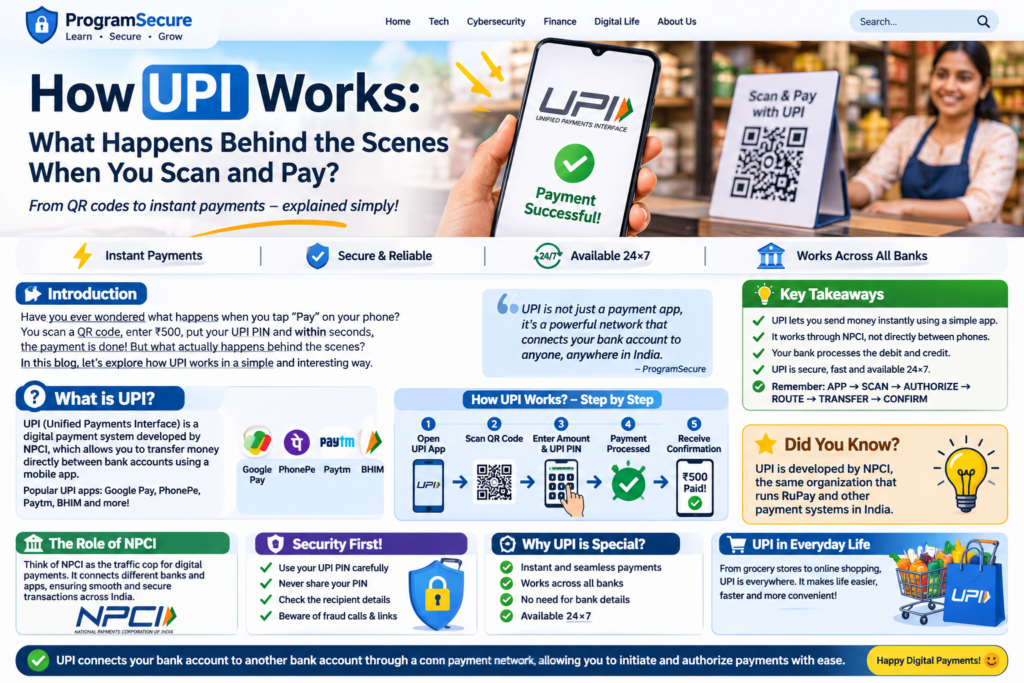
You scan a QR code, enter ₹500, tap “Pay”—and a moment later, the shopkeeper smiles at the confirmation. It feels instant. But behind that small action, your app, banks and India’s payment infrastructure exchange messages and process a transaction. Let’s unpack that journey in a visual, easy-to-follow way.
In a nutshell: UPI is a shared payment system that helps participating banks and apps send and process account-to-account payments. Your app is the interface; UPI is the network and rules connecting the participants.
What is UPI, in simple terms?
UPI stands for Unified Payments Interface. It enables interoperable payments between participating bank accounts through supported apps, using identifiers such as a UPI ID or QR code rather than requiring you to enter bank account details for every payment.
UPI is operated by the National Payments Corporation of India (NPCI). The common infrastructure helps different banks and payment apps work together.
Meet the participants: who’s doing what?
Imagine paying ₹500 to a neighbourhood shop. Here’s what the different participants contribute:
Your UPI app
The interface where you scan, review details and initiate payment. It may be operated by a bank or another payment provider.
Your bank
Holds your account and checks the payment request, authorization, balance, limits and other controls before processing a debit.
UPI / NPCI network
Provides shared network infrastructure and routing services that help participating institutions exchange transaction messages.
Recipient’s bank
Receives the relevant payment instruction and processes the credit to the recipient’s account.
Merchant
The person or business receiving the money—and the one who checks the payment status.
Transaction response
The status is communicated through the participating systems so the app and merchant can show whether it succeeded, failed or is pending.
How a UPI payment works: 5 stages
Here’s the simplified journey of a typical QR-based account-to-account payment. The internal technical sequence can vary by transaction type, app and bank.
The five-stage UPI payment journey—from scanning to confirmation.
1. Scan the QR code
Open your UPI app and scan the shop’s QR code. The code contains payment-related information that your app reads to identify the intended payee and, sometimes, additional details.
2. Review the recipient and amount
Enter ₹500 if the amount isn’t already provided. Carefully check the recipient details and amount before proceeding. A QR scan alone does not send money.
3. Authorize the payment
For a typical UPI account-to-account payment, you approve the transaction using your UPI PIN. Authorization and security checks help ensure that the payment request is permitted.
4. The request is routed and processed
The payment instruction travels through participating providers and UPI network services to the relevant institutions. Your bank performs its checks and processes the debit if approved; the receiving bank processes the credit according to the transaction flow.
5. The status is confirmed
Transaction responses help your app display a status such as successful, pending or failed. The merchant may also receive a confirmation in their app, bank notification or payment system.
A simplified UPI transaction flow
StageWhat happens1. InitiateYou scan a QR code or select a payee in the app.2. AuthorizeYou review the payment and authenticate as required.3. RoutePayment messages travel through the UPI network and participating providers.4. ProcessRelevant banks validate and process debit and credit steps.5. RespondStatus information returns to the app and relevant participants.
Think of UPI as a common language for digital payments: different banks and apps can communicate using shared rules instead of each building a unique connection to every other participant.
ProgramSecure — simplified analogy
Why does NPCI matter?
NPCI (National Payments Corporation of India) operates UPI and other retail payment systems. A shared network and common standards help participating institutions interoperate.
Without a shared system, every bank could need separate connections and agreements with many other banks. Common infrastructure reduces the need for a web of individual integrations and helps payment apps and banks work together.
What is a UPI ID (VPA)?
A UPI ID—also known as a Virtual Payment Address (VPA)—is an identifier that can be used to address a payment. It may look like a handle or name followed by a provider suffix. It makes it easier to pay without manually typing bank account and IFSC details each time.
Analogy: Think of it as a digital address that helps the payment system direct a payment to the intended account. It isn’t the same as the bank account itself.
What’s inside a UPI QR code?
A QR code is a machine-readable way of sharing payment details. A static QR may be reused, while a transaction-specific or dynamic QR can include additional details such as an amount. Your app reads the code and presents the payee details for review.
Safety reminder: Scanning a QR code is not the same as receiving money. Check the payee and amount, and only authorize payments you intend to make. You do not need to enter your UPI PIN to receive money.
Is UPI safe? 5 habits that matter
UPI payments rely on security controls across apps, devices, payment infrastructure and banks. Depending on the transaction, these can include authentication, PIN authorization, encrypted communication, limits and fraud-monitoring checks. Your own habits are important too:
Never share your UPI PIN. Genuine support staff should not ask you to disclose it.Don’t enter your PIN to receive money. PIN entry typically authorizes a debit.Verify the payee and amount. Pause before tapping approve.Use official apps and updates. Avoid installing apps from suspicious links.Be cautious with collect requests. Approve only requests you recognize and understand.
Payment pending or failed? Here’s what to do
Connectivity problems, timeouts, bank delays or technical issues can sometimes lead to a pending or failed transaction—or a debit without an immediate confirmation.
Check the transaction status in the app and your bank account.Save the reference number (UTR/RRN, if provided).Ask the recipient to check their own account or payment app status.Don’t immediately pay again while the first transaction remains pending.If it isn’t resolved, raise a complaint with your payment app or bank, quoting the reference number.
Why can UPI work 24×7?
UPI is designed for always-available digital payments, including weekends and holidays, so payments aren’t limited to normal branch hours. Individual transactions can still be affected by maintenance, connectivity or bank-side issues.
UPI app vs UPI infrastructure
UPI appUPI infrastructureThe interface you use to initiate or receive a payment.The interoperable system and services used by participating institutions.Displays QR scans, payee details, payment prompts and status.Supports messaging, routing and processing across institutions.Different apps can offer different features and designs.Common standards help those apps and banks interoperate.
Frequently asked questions
Does UPI transfer money directly between bank accounts?
UPI supports account-to-account payments between participating institutions. Payment messaging, authorization and bank processing take place through the relevant network and institutions.
Do I need the recipient’s IFSC code?
Usually not for a standard UPI payment. You typically use a UPI ID or QR code instead of entering account number and IFSC details manually.
Can I use more than one UPI app with the same bank account?
Often, yes, if your bank account and the apps support registration. The setup depends on your bank, app and eligibility.
Does regular QR-based UPI work without internet?
Standard app-based QR payments generally require connectivity. Some specialized UPI methods support limited offline or feature-phone use cases, but those differ from the typical QR scan flow.
What if money is debited but the payment is pending?
Check your app and bank records, wait for the status to update, and retain the transaction reference. If it remains unresolved, report it to your payment app or bank. Avoid repeating the payment until you’ve checked the first transaction.
Remember the journey
SCAN → REVIEW → AUTHORIZE → ROUTE & PROCESS → CONFIRM
UPI makes the user experience simple, while participating apps, banks and NPCI’s interoperable infrastructure coordinate the steps behind the scenes. Knowing how the process works—and following a few security habits—can help you pay more confidently.
Explore more
Want to explore the apps you can use? Read our guide: Best UPI Payment Apps in India.
Official references: NPCI – UPI Overview · NPCI – UPI FAQs
No Responses