Key Takeaways
In a fragmented SOC, analysts spend a big share of each case hunting down evidence and lining it up by hand. More alerts just means more of that.
Most investigation delays come from the same few causes: tools that don’t share data, the same host or user showing up under different names, and one attack arriving as several unrelated alerts.
Each delay gives attackers more time inside the network and makes the breach more expensive.
A case handed to whoever runs the next tool usually gets re-checked from scratch. Assigning each decision to one owner prevents that.
According to the SANS 2025 SOC Survey, 42% of SOCs send everything into the SIEM, often with no plan for getting it back out.
Ask a SOC analyst what fills their shift. “Analyzing threats” might come up eventually. Before that, you’ll probably hear about tab-hopping, copying IPs from one console into another, rewriting a query because the next tool wants different syntax, and waiting on whoever has access to the firewall logs.
Most of that work exists because of how the SOC workflow is put together. The alert fired. The evidence was sitting in some tool. Getting from one to the other took hours. That’s a long time when someone is already inside the network.
So where does the time actually go? And what can a team realistically change?
What a Fragmented SOC Workflow Looks Like in Practice
Having a lot of tools doesn’t make a SOC fragmented. EDR, NDR, a SIEM, identity, cloud posture, email security, ticketing: seven products is a normal stack for a mature team. It turns into a problem when each one keeps its own piece of the story and no one, human or system, is putting the pieces back together.
A few signs give it away:
Alerts arrive from every tool separately, each with its own format and its own idea of what “high severity” means.
Timestamps don’t match. One source logs in UTC and another in local time, and a third stamps the end of a session, not the start. Before anyone can build a timeline, someone has to do the math.
The ticket tells one version. The evidence is scattered across five different consoles.
Different people own triage, enrichment, and escalation, usually in different systems.
Nobody can answer, “what else did this host or user touch?” without running new searches.
Jim Skelly of Fidelis put the core issue plainly: “Looking at one piece of the picture doesn’t necessarily provide the full context of what a potential threat is for an organization.”
Where Does SOC Investigation Time Actually Go?
The alert itself is rarely the slow part. Time disappears afterward, while someone works out whether it matters, how far it has spread, and whose job it is to respond.
Fragmentation pointWhat the analyst ends up doingWhy it adds time
Siloed consoles (EDR, NDR, identity, cloud, SaaS)Jumping between tools and rerunning the same query in eachEach jump is another login, query language and data model to deal withInconsistent alert formatsFixing fields, timestamps and host names by handOne laptop can show up under three different namesNo shared case recordPiecing the story together from tickets, chat threads and notesEarlier work gets missed or done twiceTool-based handoffsPassing the case to whoever “owns” the next data sourceThe next person often starts overShort data retention or sparse telemetryTrying to scope an incident without enough historyAnalysts guess, or wait for more data to arriveDuplicate alerts for one eventTriaging the same activity more than onceThe real incident waits in the queue behind its own copies
Duplicates are easy to underestimate. Picture one phishing click setting off four alerts: email, endpoint, identity and network. In a fragmented security alert triage process those become four separate tickets. Two could be closed as benign before anybody realizes they’re all part of the same attack.
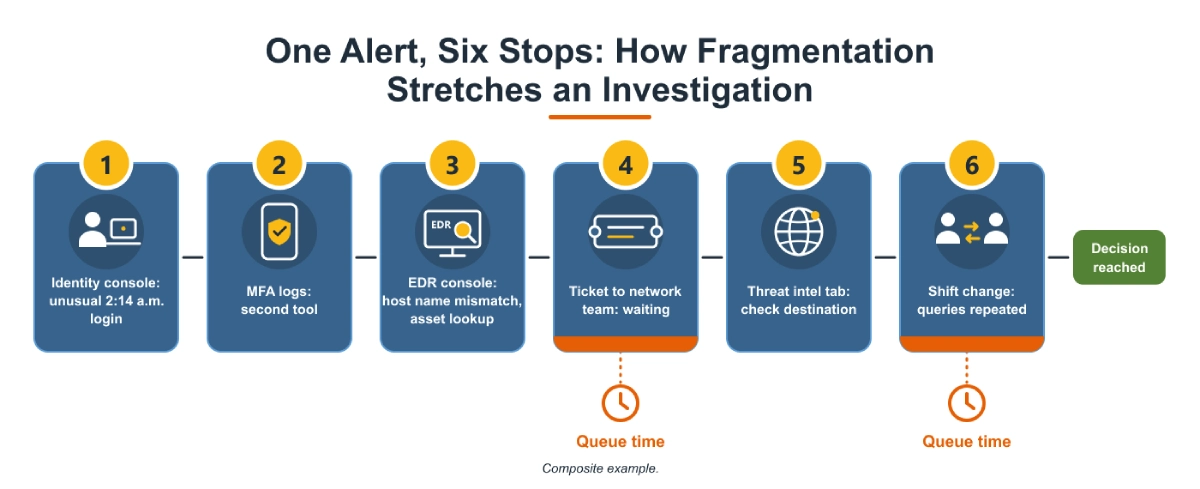
One Alert, Traced Through a Fragmented Workflow
Think of this as a composite. It’s pieced together from how these investigations commonly unfold, not taken from one particular SOC.
2:14 a.m. The identity tool flags a finance user signing in from a location they’ve never used.
You’re on tier 1. The login went through, so you open a second tool to check MFA.
Next question: what did the user do after logging in? That’s in EDR. You search by host name and get nothing, because EDR knows the machine by a different name. Off to the asset inventory to match them up.
EDR shows PowerShell starting a minute or so after the login. Did anything leave the network? You can’t see that. The network team can, so you raise a ticket and wait.
The reply comes back a few hours later: a list of external connections. One destination looks suspicious. The analyst checks it against threat intelligence in yet another tab.
Your shift ended an hour ago. Whoever picks the ticket up reads your notes, can’t find the exact search terms you used, and runs half the queries again.
Nobody did anything wrong. Still, a call that should have taken minutes stretched past a shift change, and nearly all of the waiting happened between steps 3 and 6.
Handoffs: The Delay Most Dashboards Miss
Tool sprawl gets most of the attention. In many SOCs, though, the handoffs between people eat more analyst time than the number of tools does.
How much a handoff costs depends on what gets passed along. If the next person receives the timeline, the evidence and a note on what’s already been ruled out, they can pick up where the last one stopped. If they get a two-line ticket and a handful of IPs, they’re starting from zero.
The trouble is that in a fragmented incident response workflow, cases tend to move by tool ownership. Network data belongs to the network team, cloud logs to the cloud team, so the case ends up wherever the next piece of evidence happens to live. Who ought to make the call gets decided late, or not at all.
CIS Control 17[1], Incident Response Management, tackles this head-on. It asks organizations to name the people responsible for incident handling, define their roles, and document the process. Put simply, decide who owns which decision before the incident, not during it.
Skip that, and two costs creep in:
Re-investigation: The new owner can’t see why the last person concluded what they did, so they check it all again.
Queue time: The case waits in someone else’s backlog, and queue time is invisible in most dashboards because nobody is “working” it.
What the Data Says About Delay, and What It Does Not
Start with IBM’s Cost of a Data Breach Report 2025[2]. On average, organizations took 241 days to identify and contain a breach: 181 days to find it, then another 60 to contain it. That’s the best figure in nine years, and 17 days quicker than in 2024.
Two details from the same report connect directly to fragmentation:
Breaches involving data stored across multiple environments took 276 days to identify and contain, longer than the average.
Breaches resolved in under 200 days cost an average of $3.87 million, compared with $5.01 million for those that took longer.
The report also found that organizations using security AI and automation extensively shortened the breach lifecycle by 80 days and saved about $1.9 million per breach on average.
A word of caution here. These are breach lifecycle figures, and they measure something wider than SOC investigation time. A 241-day lifecycle includes long stretches when nobody knew a breach existed. The numbers show that speed and cost move together. They can’t tell you how many days any single workflow change will save.
The SANS 2025 SOC Survey[3], led by Christopher Crowley, adds a view from inside the SOC:
85% of respondents say endpoint security alerts are their primary trigger for response. Network, identity, and cloud signals can easily join the investigation later.
42% of SOCs dump all incoming data into a SIEM, often without a retrieval or management plan.
42% use AI/ML tools “out of the box” with no customization, and AI/ML sat at the bottom of the survey’s satisfaction list.
The SIEM finding is fragmentation hiding inside centralization. Everything lands in one store, yet an analyst who needs a specific session from three weeks ago may still have no practical way to pull it back out.
Does Tool Consolidation Fix a Fragmented SOC Workflow?
Only sometimes.
Consolidation helps when it changes how evidence comes together. If it only moves the login screen, very little changes. A unified dashboard that still sends analysts into native consoles for detail is one more layer on top of the old ones.
There’s a fair counterpoint here. Some separation is deliberate. A dedicated network or endpoint tool will usually show you more in its own area than a do-everything platform, and in regulated industries, keeping certain duties apart is a requirement. So, the number of tools may matter less than people assume. The real question is whether everyone in a case is looking at one timeline and one record.
Security tool integration also has a cost. As Christopher Crowley, who led the SANS survey, put it, new tech eats budget, training and time, and it has to be worked into the workflow before it pays off. Buy an integration layer, leave case ownership as it was, and the delays usually stay. You just have one more product to patch and renew.
Here’s a test worth running. Pick a closed incident from last quarter and count how many consoles an analyst had to open to scope it. If a new platform would not reduce that number, it will not reduce investigation time much either.
Practical Steps for Reducing Mean Time to Respond
Most of what helps is less dramatic than a platform swap.
Measure each stage separately: Track time from alert to first touch, first touch to scoping decision, and decision to containment. A single mean time to respond figure hides where the delay actually is.
Normalize identity early: Map users, hosts, and IPs to a common identifier so analysts are not translating between naming schemes mid-investigation.
Correlate before triage: Group related alerts by entity and time window so one incident arrives as one case. This is where alert correlation and investigation pays off most.
Give every decision an owner: Define who owns containment, scoping, and escalation for each incident type, as CIS Control 17 recommends.
Keep enough history to look back: Short retention forces analysts to guess at scope. Session-level metadata kept for longer periods is often more practical than full packet capture.
Put the evidence in the handoff note: Include the exact queries, timestamps, and ruled-out hypotheses so the next analyst does not repeat work.
Tune before you automate: Automating a broken triage process produces wrong answers faster.
Step three is the one most teams feel first. As Jim Skelly of Fidelis said: “Security teams deal with millions of alerts every day. Even after policy-based filtering, SOC teams still have to investigate them. Having end-to-end visibility is important because it helps reduce that burden.”
Identify and neutralize threats faster
Gain full visibility across your attack surface
Automate security operations for efficiency
How Fidelis Security Approaches Fragmented Investigations
Fidelis Security brings network, endpoint, identity, deception, and cloud context into one investigation through Fidelis Elevate® (Fidelis XDR), so analysts start with correlated evidence instead of assembling it themselves.
Fragmentation pointWhat the analyst ends up doingWhy it adds time
Alerts lack the “what happened before and after”Session-level forensic contextDeep Session Inspection in Fidelis Network® (Fidelis NDR) retains more than 300 metadata fields per sessionAnalysts rebuild timelines by handCorrelated incident timelineFidelis Elevate® links activity tied to an IP address across subsequent alertsEndpoint and network evidence live apartCross-domain correlationFidelis Endpoint® (Fidelis EDR) data correlated with network sessions in Fidelis XDRCompromised accounts are hard to traceIdentity-to-network correlationActive Directory Intercept ties directory activity to network behaviorToo many alerts to triageHigh-fidelity detectionFidelis Deception® decoys, where any interaction has no legitimate explanation, so fewer alerts need checkingCloud evidence arrives late or in batchesContinuous cloud telemetryFidelis Halo® (Fidelis CNAPP) keeps cloud evidence collected before the investigation starts
On the timeline point, Jim Skelly of Fidelis explained: “In Fidelis XDR, we take a timeline from when we first see activity associated with an IP address through every subsequent alert. That timeline gives analysts the forensic context they need to investigate incidents, take ownership of alerts, and escalate them when necessary.”
Go back to step 4 of the walk-through, where the analyst had a suspicious login and no quick way to see the network side. That is the gap Skelly described here: “With Fidelis, we can correlate Active Directory activity with network behavior through our NDR product to identify compromised users, privilege escalation attempts, and understand what that user is doing across the network.”
Cloud telemetry has its own version of the problem. Gaurav Bahadur of Fidelis noted: “Telemetry collected only a few times a day can leave significant visibility gaps.”
A correlated timeline still depends on people. If nobody agrees on who acts on it, the case sits in a queue just as it did before.
Pull up the last incident your team closed and count the tabs. That number is a decent proxy for how fragmented your SOC workflow really is.
Frequently Asked Questions
How can a team tell how long its investigations really take?
Timestamp three points per case: first opened, scope agreed, containment started. The gaps between them show where cases stall, which a single MTTR average can’t.
Should tier 1 analysts have access to every security console?
Usually not. A single correlated case view, with read-only access to the evidence behind it, tends to be quicker for them to work from and carries less risk.
Can Security Orchestration, Automation, and Response (SOAR) fix a fragmented SOC workflow on its own?
SOAR automates steps between tools, but it does not create missing context. If the underlying data is not correlated, playbooks move incomplete cases faster.
How much network metadata history do investigators need?
Enough to reach back past your likely attacker dwell time and satisfy your compliance rules. Otherwise, an incident spotted weeks later can’t be fully scoped.
Where should a team start if it wants less fragmentation?
Make sure a user, host, or IP carries the same identifier across your identity, endpoint, and network data. It is low risk, needs no new tool, and removes a translation step from almost every investigation.
The post Why Fragmented SOC Workflows Increase Investigation Time appeared first on Fidelis Security.
No Responses