Key Takeaways
Azure Zero Trust goes beyond authentication. Compromised identities and workloads can misuse legitimate access, making continuous monitoring essential.
Azure Zero Trust requires monitoring beyond network segmentation. Fidelis helps detect suspicious activity within permitted network connections.
Fidelis Active Directory Intercept helps detect Kerberos abuse, AD reconnaissance, and lateral movement, strengthening protection across hybrid environments.
Fidelis supports the assume-breach approach with deep network inspection, deception, workload risk assessment, and XDR.
Fidelis strengthens Zero Trust investigations by helping SOC teams connect evidence, assess the impact of a compromise, and coordinate response.
An employee signs in through Microsoft Entra ID, completes their authentication, and accesses an app they are authorized to use. Now imagine an attacker has gained access to the employee’s authenticated session or device. The access may still satisfy the organization’s policies, but the person or process using it may no longer be trustworthy.
The attacker can potentially access resources available to the employee, explore connected systems, and attempt to steal sensitive information.
Microsoft Azure provides strong identity and access controls, but successful authentication does not guarantee legitimate activity. An effective Azure Zero Trust implementation must also detect and investigate threats involving compromised credentials, authenticated sessions, and permitted connections.
Microsoft’s 2026 Digital Defense Report[1] found that 52.2% of intrusions involving valid accounts included follow-on credential theft. It also found that 63% of observed intrusions involved data theft.
At Fidelis, we help organizations put the assume-breach principle into practice. Our solutions complement Microsoft’s controls by helping security teams identify suspicious behavior, investigate threats within permitted access paths, and respond across Azure and hybrid environments.
Let’s look at how these capabilities support the security requirements of an Azure Zero Trust architecture.
What Security Controls are Included in Azure Zero Trust?
Microsoft’s Zero Trust architecture follows three established principles:
Verify explicitly
Use least-privilege access
Assume breach
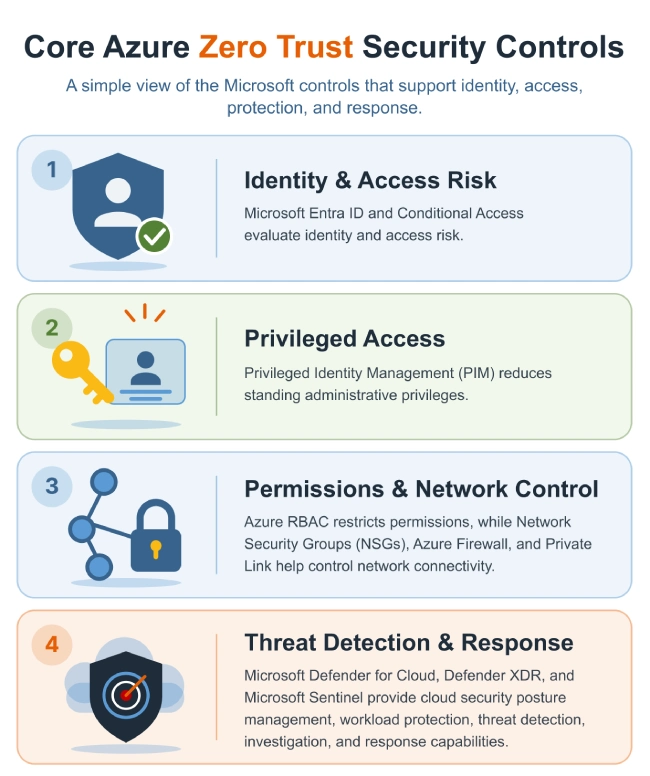
Azure supports these principles through several complementary security controls.
Microsoft’s Zero Trust approach is comprehensive, but there are a few challenges:
Applying Microsoft’s requirements is complicated in hybrid environments.
To understand how least-privilege permissions are being used, security teams also need relevant activity monitoring, threat detection, and investigation evidence.
Microsoft’s assume-breach guidance for Azure calls for: Network segmentation Traffic visibility Threat detection Measures to limit the impact of a compromise
Dynamic threat monitoring
Proactive Cyber Defense
Zero Trust in Action
Why Authentication Alone Isn’t Enough
Microsoft Entra Conditional Access uses contextual signals to inform access decisions. Organizations can also enforce controls such as authentication strength requirements and device compliance.
Microsoft’s Continuous Access Evaluation (CAE) can respond to certain changes in identity or policy conditions for supported applications and resources. But access-policy evaluation and monitoring the behavior of an authenticated workload are different security functions.
However, attackers may not need to bypass those controls directly. Activities that are particularly concerning are:
A domain-joined Azure VM enumerating Active Directory objects or querying services over LDAP and Kerberos.
An attacker reusing an approved administrative path to reach additional workloads or internal SMB shares.
A compromised account accessing sensitive files within its assigned privileges.
Unexpected outbound connections or data transfers over permitted channels.
Workload configuration changes or service permission abuse intended to maintain access.
Microsoft-native security tools can detect many of these behaviors when appropriately deployed and configured. Additional network inspection, deception, and workload monitoring can strengthen coverage.
During an investigation, the SOC needs to connect the activity across systems. Without sufficient evidence, analysts may have several alerts but still struggle to establish the sequence and scope of the intrusion.
At Fidelis, we address these requirements by strengthening the threat detection, investigation, and response capabilities that support an organization’s Azure Zero Trust strategy.
How Fidelis Strengthens Azure Zero Trust Across Five Security Areas
An effective Azure Zero Trust implementation depends on more than enforcing access decisions. Microsoft provides the identity, network, workload, and security operations controls needed to implement the architecture.
At Fidelis, we strengthen the detection and investigation capabilities that support those controls, particularly when attackers exploit legitimate permissions or move across hybrid infrastructure.
Our capabilities span:
Network Inspection
Traditional Active Directory threat detection
Deception
Cloud Security Posture Management
Workload Protection
We focus on areas where security teams need to maintain visibility and investigate risk throughout the Azure Zero Trust architecture:
Permitted network connections
Hybrid identity infrastructure
Attacker activity after compromise
Cloud workload posture
Coordinated detection and response
Each addresses a different part of the Zero Trust strategy. Some help identify weaknesses that could undermine least privilege. Others support the assume-breach principle by detecting suspicious behavior and establishing the evidence needed for response.
We complement Microsoft’s native security controls, giving organizations additional detection and investigation capabilities where their existing coverage needs greater depth. Here’s how our solutions contribute to an Azure Zero Trust architecture.
1. Monitor Activity Within Permitted Azure Network Connections
Azure Zero Trust principle: Assume breach
Network segmentation is an important part of Zero Trust in Azure. Organizations use NSGs, Azure Firewall, and other controls to restrict communication between workloads and networks.
These controls help reduce unnecessary connectivity and limit potential lateral movement. Microsoft’s Azure Zero Trust networking guidance also calls for visibility into network traffic so organizations can detect threats within their infrastructure.
However, attackers who have compromised an authorized workload may continue using the network paths already available to it. We address this challenge through Fidelis Network® and our Deep Session Inspection® (DSI) technology.
DSI analyzes network sessions and extracts rich protocol-aware metadata, providing more context than connection-level flow records alone. We combine this information with threat intelligence to help security teams recognize suspicious activity. Fidelis Network® helps analysts examine session behavior, identify unusual communication patterns, and investigate activity that could indicate reconnaissance or lateral movement, where relevant traffic is available to our sensors.
This supports the assume-breach principle by adding threat detection within the network paths that an organization has deliberately permitted. It does not replace segmentation or make authorization decisions on Azure’s behalf.
We also support preventative actions through appropriately configured sensor policies. When a detection rule is met and the applicable action is enabled, supported sensors can take action without requiring an analyst to manually initiate every response.
Encrypted traffic requires a more nuanced approach. We can derive useful detection signals from TLS metadata and observable traffic characteristics without decrypting the payload. Where content inspection is necessary, we rely on supported decryption and inspection capabilities.
There is also an architectural consideration specific to Azure. Our ability to analyze traffic depends on how it is made available to Fidelis sensors. We don’t assume that every Azure workload or managed service is automatically visible.
During deployment, we recommend identifying the relevant Azure-to-on-premises and east-west traffic paths, confirming how traffic can be acquired through supported methods, and validating which sessions are visible to the sensors. For a Zero Trust deployment, this validation is essential as security teams need to know which permitted network paths are monitored, which services are outside the inspection scope, and where additional telemetry is necessary.
Fidelis Network therefore contributes to Azure Zero Trust by helping organizations monitor permitted network activity, recognize suspicious behavior, and investigate possible lateral movement across supported network paths.
2. Detect Identity and Privilege Abuse Across Hybrid Environments
Azure Zero Trust principles: Verify explicitly and use least privilege
Identity remains central to Zero Trust, but we believe organizations need to distinguish between protecting cloud authentication and protecting traditional Active Directory infrastructure.
Microsoft Entra ID, formerly Azure Active Directory, handles cloud identity and access management.
Windows Server Active Directory Domain Services (AD DS) continues to support domain authentication, Kerberos, LDAP, and other directory services used across enterprise networks.
Azure Zero Trust relies on identity verification and least-privilege policies to control access to cloud resources. However, organizations with hybrid identity environments must also protect the traditional AD infrastructure that supports domain-connected workloads, applications, and administrative services.
With Fidelis Active Directory Intercept, we combine AD-aware network inspection, directory-focused deception, and threat detection to identify suspicious behavior involving traditional Active Directory infrastructure.
Our detection capabilities cover techniques such as:
LDAP reconnaissance and AD enumeration.
Kerberoasting and AS-REP roasting.
Suspicious Kerberos authentication activity.
DCSync and DCShadow.
Lateral movement and privilege escalation involving AD infrastructure.
We inspect relevant directory protocols and use deceptive AD objects and breadcrumbs to help identify attackers exploring the environment.
This strengthens an Azure Zero Trust strategy by helping security teams identify attempts to abuse identities and privileges within traditional AD infrastructure. It complements Entra’s cloud identity controls rather than providing native Conditional Access enforcement.
For organizations maintaining hybrid identity dependencies, enforcing least privilege reduces available permissions, while detecting attempts to misuse those permissions helps the SOC identify attacks that are already underway.
3. Use Deception to Expose Attackers After Access Is Granted
Azure Zero Trust principle: Assume breach
One difficulty with detecting attackers who have legitimate credentials is that their activity can resemble ordinary administration. Behavioral analytics can help distinguish suspicious activity, but analysts often need additional evidence before determining whether a particular action is malicious. We use deception to provide that evidence.
Fidelis Deception® places decoys, deceptive credentials, breadcrumbs, and other realistic assets in an organization’s environment.
These assets are designed to be encountered by attackers conducting reconnaissance, searching for credentials, or attempting lateral movement. They have no legitimate production purpose. Unlike an ordinary connection to a production server, interaction with a properly configured deceptive asset has a much stronger implication of unauthorized activity.
Microsoft’s assume-breach principle calls for security controls that operate with the expectation that attackers may already be present. Deception supports this objective by making certain post-compromise activities easier to identify.
We also use cyber terrain mapping, asset discovery, and profiling to help determine where deceptive assets should be positioned.
Placement is important. In Azure and hybrid deployments, Fidelis Deception can be used to strengthen detection around relevant workloads, identity infrastructure, and administrative access paths.
The objective is not to deploy decoys indiscriminately. It is to place believable assets where attacker interaction would provide meaningful evidence and support earlier investigation.
Fidelis Deception adds value to the assume-breach approach by helping identify attackers who are already operating within the environment, including those using compromised accounts or legitimate network paths.
When integrated with our broader detection and response capabilities, deception alerts can also help analysts investigate the source of the activity and determine whether related reconnaissance or lateral movement occurred.
4. Continuously Assess Azure Workload Security and Risk
Azure Zero Trust principles: Use least privilege and assume breach
Azure Zero Trust also requires organizations to secure the infrastructure and workloads that users, applications, and services depend on.
A workload can be properly authenticated and still introduce risk through insecure configurations, vulnerable software, or excessive permissions. These exposures can develop long after the workload was initially deployed.
Microsoft recommends least-privilege permissions, secure workload configurations, network segmentation, and continuous security monitoring as part of Azure Zero Trust.
Microsoft Defender for Cloud provides native cloud security posture management and workload protection. At Fidelis, we address these requirements through Fidelis Halo®, which supports Azure as well as other cloud and on-premises environments.
FIdelis Halo, our CNAPP, portfolio contributes to ongoing security posture assessment and workload monitoring through three services. These help security teams identify exposures and configuration changes that could undermine their Zero Trust objectives.
1. Fidelis Cloud Secure
We provide agentless cloud security posture management to help organizations:
Discover cloud resources
Maintain inventory
Assess configurations
Identify security exposures
Monitor compliance across supported Azure services
In an Azure Zero Trust implementation, this supports the need to maintain awareness of cloud assets and the risks associated with their configurations.
Consider an Azure workload deployed with unnecessary network exposure or permissions beyond its operational requirements. The access granted to that resource may be broader than the organization’s intended least-privilege model.
Fidelis Cloud Secure can help identify supported configuration and permission-related risks so teams can investigate and remediate the exposure using the appropriate Azure controls.
This is an important distinction. Fidelis Halo assesses relevant security risks; Azure’s native identity, authorization, and networking services remain responsible for enforcing their configured access policies.
2. Fidelis Server Secure
We use lightweight microagents on supported Windows and Linux servers to monitor workload security.
Capabilities include:
Configuration assessment
File integrity monitoring
Log-based intrusion detection
Network connection visibility
Consider an Azure VM supporting an important business application. An administrator modifies its configuration while troubleshooting an issue, unintentionally introducing a security weakness.
Our workload monitoring capabilities can help identify relevant changes so the security team can investigate and remediate the exposure.
From a Zero Trust perspective, the security posture of a workload cannot be assumed to remain unchanged after deployment. Configuration changes, new vulnerabilities, and unexpected host activity may alter the risk associated with that workload.
Fidelis Server Secure provides workload-level findings that can help security teams identify these changes and assess whether further investigation or remediation is required.
3. Fidelis Container Secure
We extend security assessment and monitoring to supported container environments, including container images, registries, hosts, and Kubernetes configurations.
As organizations expand their containerized workloads, we help them assess vulnerabilities and configuration risks across the relevant infrastructure.
In Azure environments using supported container infrastructure, these capabilities help teams assess security weaknesses across container images, hosts, and Kubernetes configurations.
This supports the Zero Trust requirement to maintain secure infrastructure and reduce opportunities for attackers to exploit vulnerable or misconfigured workloads.
We don’t believe organizations should add another cloud security product simply to produce more findings.
If an organization already uses Defender for Cloud, we recommend evaluating Fidelis Halo against specific workload security and posture-management requirements. The strongest case for adding Fidelis is where it provides useful coverage or assessment capabilities across Azure, other cloud platforms, and on-premises infrastructure.
For Azure Zero Trust, the contribution is better awareness of workload risk and configuration changes that could weaken the security controls organizations depend on.
5. Investigate and Respond When Authorized Access Is Misused
Azure Zero Trust principle: Assume breach
Microsoft’s Azure Zero Trust guidance includes continuous threat detection and response as part of the assume-breach approach. Segmentation helps limit the paths an attacker can use, while detection and investigation capabilities help determine whether a compromise has occurred and what systems may be affected.
For a SOC investigating an attacker operating through legitimate access, the challenge is establishing what happened after the initial compromise.
Was the compromised account used to access additional systems?
Did the attacker reach sensitive information?
Was data transferred outside an approved boundary?
Our Fidelis Network Data Loss Prevention (DLP) capabilities use Deep Session Inspection and policy-based controls to identify sensitive content and potentially unauthorized data transfers within traffic available for inspection.
For example, an attacker operating from a compromised Azure-connected workload may attempt to transfer protected information through an allowed communication channel.
Where the traffic and content are available for inspection, Fidelis Network DLP can help identify transfers matching configured security policies and support investigation into possible data exfiltration.
This complements Azure’s identity, network, and data protection controls by contributing detection and policy-based protection for sensitive information moving through monitored network paths.
Detecting suspicious data movement is only part of an investigation. Analysts also need to understand the events leading up to it.
We designed Fidelis Elevate®, our open and active XDR platform, to bring supported network, endpoint, and deception capabilities together for detection, investigation, and coordinated response.
Fidelis Network® can provide session-level evidence.
Fidelis Endpoint® can contribute host and process information.
Fidelis Deception® can identify interactions with decoys and breadcrumbs.
By correlating the available findings, we help analysts establish relationships between activity that might otherwise appear as separate events.
Consider an incident involving a compromised Azure-hosted server. Network inspection identifies suspicious communication with an internal system. Endpoint telemetry reveals a process associated with the activity. A deception alert indicates that the same system attempted to interact with a decoy.
When the relevant Fidelis capabilities are deployed and integrated, Fidelis Elevate can help analysts investigate these related findings, identify affected systems, and determine whether the activity represents a broader compromise.
Where supported and properly configured, response can include endpoint containment, network prevention policies, and other coordinated actions.
These capabilities support the assume-breach model by helping security teams move from suspicious activity to investigation and containment.
Microsoft Entra ID, Azure networking services, and other native controls remain important for actions such as revoking access, modifying permissions, or restricting Azure resources. Our contribution is the additional threat context and supported response capabilities that help inform those decisions.
Where Can Fidelis Add Value to Your Existing Azure Zero Trust Architecture?
If your organization already uses Microsoft Entra ID, Defender for Cloud, Defender XDR, and Sentinel, evaluating Fidelis should begin with your existing Zero Trust coverage rather than a generic product comparison.
We recommend looking at how effectively your current security stack supports the following requirements.
1. Visibility within segmented networks
Azure NSGs and Azure Firewall help enforce network boundaries. But can your SOC investigate suspicious communications taking place through approved connections? Determine whether additional session-level evidence from Fidelis Network would improve detection and investigation.
2. Protection against identity and privilege abuse
Conditional Access, Azure RBAC, and PIM support access control and least privilege. In hybrid environments, can your security team also detect attacks against traditional AD infrastructure? Evaluate Fidelis Active Directory Intercept against relevant Kerberos, LDAP, and credential-abuse scenarios.
3. Detection of attackers already inside the environment
An assume-breach architecture should account for adversaries operating with compromised credentials or workloads. Assess whether Fidelis Deception can expose reconnaissance and lateral movement through realistic decoys and breadcrumbs placed along relevant attack paths.
4. Continuous workload risk assessment
Azure Zero Trust depends on secure and appropriately configured workloads. Determine whether Fidelis Halo adds useful assessment or monitoring coverage for your Azure servers, containers, cloud resources, and hybrid infrastructure.
Identify and neutralize threats faster
Gain full visibility across your attack surface
Automate security operations for efficiency
5. Investigation and response across security domains
Test whether your analysts can connect network, endpoint, and deception evidence during a simulated compromise. Evaluate how Fidelis Elevate contributes to the investigation and how its supported response capabilities work alongside your existing Microsoft security controls.
We recommend testing these requirements using scenarios from your environment. For example, simulate suspicious AD enumeration from an Azure-hosted domain member or unusual SMB access through a permitted network connection. Include legitimate administrative activity so the evaluation can distinguish meaningful detections from unnecessary alerts.
At Fidelis, we believe a Zero Trust investment should demonstrate an improvement in security outcomes. That could mean identifying activity that was previously difficult to detect, obtaining stronger investigation evidence, or improving the SOC’s ability to respond to a compromise.
The objective is not to duplicate Microsoft’s access controls. It is to determine where our capabilities can make your existing Azure Zero Trust implementation more effective.
Is Your Azure Zero Trust Strategy Ready for a Real Attack?
It’s easy to measure how extensively you’ve implemented Azure security controls. You can review Conditional Access policies, audit permissions, check workload configurations, and assess compliance. But these assessments don’t always tell you how well your security team would handle an attacker operating across Azure and connected on-premises systems.
At Fidelis, we believe organizations should judge their Azure Zero Trust maturity by what their security teams can actually establish during an incident, not just by the controls they have deployed.
The next time you review your Azure Zero Trust architecture, consider this: If an attacker compromised one of your Azure workloads today, could your SOC trace where they went, what they accessed, and whether they reached systems beyond Azure?
Frequently Asked Questions
What is Azure Zero Trust security?
Azure Zero Trust is Microsoft’s approach to securing identities, applications, workloads, networks, and data through explicit verification, least-privilege access, and an assume-breach strategy. It combines identity security and access enforcement with segmentation, monitoring, threat detection, and response.
How does Azure Active Directory support Zero Trust?
Azure Active Directory, now Microsoft Entra ID, supports Zero Trust through capabilities such as:
Conditional AccessIdentity protectionPrivileged access management
These help organizations manage access based on identity, device, risk, and other contextual signals. We complement these capabilities by helping detect suspicious activity within permitted network connections and traditional AD infrastructure.
How does Fidelis help detect lateral movement in Azure and hybrid environments?
We use Fidelis Network’s Deep Session Inspection and behavioral analytics to identify suspicious communication patterns in monitored traffic. Our Active Directory Intercept capabilities help identify directory-related attacks, while Fidelis Deception exposes attackers interacting with decoys and breadcrumbs.
Together, these capabilities can strengthen lateral movement detection across supported Azure and hybrid network paths.
Does Fidelis replace Microsoft Defender or Entra ID?
No. We complement Microsoft’s native security capabilities.
Microsoft Entra ID, Defender for Cloud, Defender XDR, and Sentinel provide identity protection, cloud security, detection, and investigation capabilities. We contribute additional network inspection, traditional AD threat detection, deception, workload assessment, and cross-domain investigation capabilities where organizations need them.
Can Fidelis detect threats inside encrypted Azure traffic?
We can analyze available TLS metadata and encrypted-traffic characteristics to identify suspicious patterns without necessarily decrypting the payload. Content-level inspection requires appropriate decryption and inspection capabilities.
Actual visibility depends on the Azure network architecture and how relevant traffic is made available to Fidelis sensors.
Citations:
The post How Fidelis Security Strengthens Azure Zero Trust Beyond Identity and Access appeared first on Fidelis Security.
No Responses